


GPS to Map Service
Welcome to GPS-to-Map and GPS-to-Map PRO
A service for when you are out and about between the games  , by the Biber Mania Team!
Free – no registration required
The Service
What is the GPS to Map Service and what can it do?
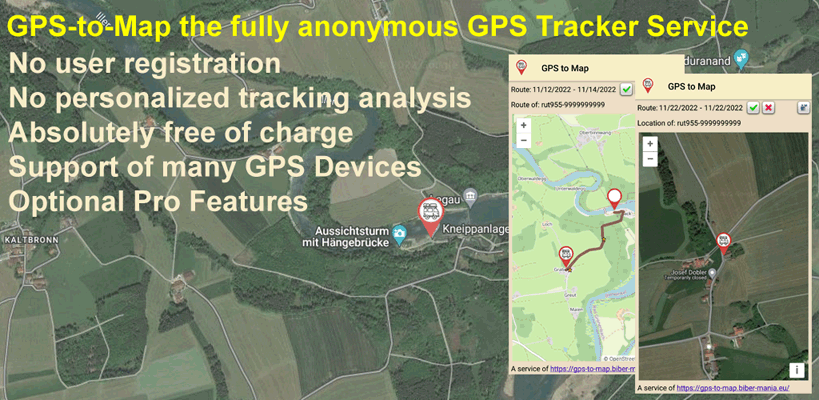
GPS to Map is a service that lets you share your current position with family, friends or acquaintances. In case of theft you can also check the position yourself, as long as it is still being sent.
The essential difference to many other services of this kind - which was also very important to us - is that all data is stored anonymously and cannot be processed in a personalised way. All the service knows is the device type, the serial number and, optionally, a password you have chosen. The first version of the service was created by Uwe Markus - many thanks for that - and in the end it had to be completely rewritten to avoid overloading the server. It is now maintained by the Biber Mania Team.
The service needs a device that can send GPS data to a configurable address (e.g. the Teltonika RUT955 router).
The essential difference to many other services of this kind - which was also very important to us - is that all data is stored anonymously and cannot be processed in a personalised way. All the service knows is the device type, the serial number and, optionally, a password you have chosen. The first version of the service was created by Uwe Markus - many thanks for that - and in the end it had to be completely rewritten to avoid overloading the server. It is now maintained by the Biber Mania Team.
The service needs a device that can send GPS data to a configurable address (e.g. the Teltonika RUT955 router).
GPS to Map ...
• quickly and easily shows the current position by opening an individual URL
• is independent of third-party websites or other services
• works without registration, everything is completely anonymous!
• is quick and easy to set up and to use
• works with a wide range of devices, e.g. also with the Teltonika GPS routers RUT850 and RUT955
• quickly and easily shows the current position by opening an individual URL
• is independent of third-party websites or other services
• works without registration, everything is completely anonymous!
• is quick and easy to set up and to use
• works with a wide range of devices, e.g. also with the Teltonika GPS routers RUT850 and RUT955
GPS to Map cannot ...
• track or manage routes, only the last position is ever shown
• store any additional data besides the last coordinates under an anonymous ID
• allow any evaluation or analysis of the data by us or by third parties
• draw any kind of conclusion about the user from the display URL
• be extended with additional features
• track or manage routes, only the last position is ever shown
• store any additional data besides the last coordinates under an anonymous ID
• allow any evaluation or analysis of the data by us or by third parties
• draw any kind of conclusion about the user from the display URL
• be extended with additional features
Is the GPS to Map Service free of charge?
The GPS to Map Service can be used completely free of charge and is provided as such by the Biber Mania Team. Since the server and the service itself do of course cost us money, we would be happy if you supported the service by buying a Biber-Mania card game and recommended it to your friends and acquaintances. We are a small independent publisher and are happy about every recommendation. Thank you!
To avoid overloading, the free service is limited to an update interval of 10 minutes. With a subscription of the GPS-to-Map App the interval is automatically reduced to 60 seconds. If you need shorter intervals please contact us. Further important notes about the use of the service can be found below.
To avoid overloading, the free service is limited to an update interval of 10 minutes. With a subscription of the GPS-to-Map App the interval is automatically reduced to 60 seconds. If you need shorter intervals please contact us. Further important notes about the use of the service can be found below.
What is the GPS to Map PRO Service and what can it do?
The GPS to Map PRO Service is an extension of the standard features and is unlocked via an inexpensive monthly subscription. The subscription can be activated with a small Android app and can be cancelled at any time. So it is also possible to test it for just one month. The GPS to Map PRO subscription unlocks a whole range of additional options.
GPS to Map PRO can additionally ...
• shorten the update interval from 10 minutes to 1 minute
• use its own internal GPS tracker. No external hardware needed anymore!
• use different map views
• save and recall routes you have travelled (diary function), everything stays completely anonymous!
• display routes for a selected period of time
• create and save your own places of interest (POI) on the map
• show places of interest (POI) within a definable radius
• share saved places of interest (POI) with others
• shorten the update interval from 10 minutes to 1 minute
• use its own internal GPS tracker. No external hardware needed anymore!
• use different map views
• save and recall routes you have travelled (diary function), everything stays completely anonymous!
• display routes for a selected period of time
• create and save your own places of interest (POI) on the map
• show places of interest (POI) within a definable radius
• share saved places of interest (POI) with others
How is the service set up and used?
The page https://gps-to-map.biber-mania.eu offers a free service for processing the GPS signals sent by the Teltonika RUT955 and other systems that transmit NMEA data. The configuration is done exclusively on your own device, no registration or configuration is needed on our website.
Sending the data from the router
To do this you simply activate sending the data via https in the router and enter the device-specific URL as host.
The link is composed as follows https://gps-to-map.biber-mania.eu/{devicetype}pos
e.g.: https://gps-to-map.biber-mania.eu/rut955pos or https://gps-to-map.biber-mania.eu/rutx11pos.
As soon as the data is sent by the router (sending GPRMC data has to be activated), the position can be retrieved immediately. If the display is not possible, something is wrong with the configuration in the router. There is no delay for the first position display.
(In case of problems the router firmware may need to be updated.)
Displaying the position
To retrieve the position you need the serial number or ID of the router. With this serial number/ID, everyone who knows the correct link can retrieve the current position and speed of the router's location.
The link is composed as follows https://gps-to-map.biber-mania.eu/{devicetype}-{serialnumber}
e.g.: https://gps-to-map.biber-mania.eu/rut955-123456789 or https://gps-to-map.biber-mania.eu/rutx11-123456789
The display page with your current position then opens. From this page you can also send an email with the link to the position display to authorised people. Below you can download the configuration help for the devices we know. If you use a different device that can send NMEA data, please contact us.
Just give it a try with this test link:
https://gps-to-map.biber-mania.eu/rut955-9999999999
Tip: It is possible that your browser settings (especially with Safari) prevent the map from being displayed. In that case simply try Firefox or Chrome or adjust your security settings accordingly.
Important information:
Only the last record is ever stored anonymously in the database. The record consists of an encrypted (MD5) hash code of the serial number (which cannot be decrypted again), the current position and the speed. No history or track record is stored.
Further information about privacy and anonymity
The database is on a German server and is subject to German data protection law. The database does not contain any information that could be traced back to the user as a person. For each user only one single position report - the last one - is stored!
Sending the data from the router
To do this you simply activate sending the data via https in the router and enter the device-specific URL as host.
The link is composed as follows https://gps-to-map.biber-mania.eu/{devicetype}pos
e.g.: https://gps-to-map.biber-mania.eu/rut955pos or https://gps-to-map.biber-mania.eu/rutx11pos.
As soon as the data is sent by the router (sending GPRMC data has to be activated), the position can be retrieved immediately. If the display is not possible, something is wrong with the configuration in the router. There is no delay for the first position display.
(In case of problems the router firmware may need to be updated.)
Displaying the position
To retrieve the position you need the serial number or ID of the router. With this serial number/ID, everyone who knows the correct link can retrieve the current position and speed of the router's location.
The link is composed as follows https://gps-to-map.biber-mania.eu/{devicetype}-{serialnumber}
e.g.: https://gps-to-map.biber-mania.eu/rut955-123456789 or https://gps-to-map.biber-mania.eu/rutx11-123456789
The display page with your current position then opens. From this page you can also send an email with the link to the position display to authorised people. Below you can download the configuration help for the devices we know. If you use a different device that can send NMEA data, please contact us.
Just give it a try with this test link:
https://gps-to-map.biber-mania.eu/rut955-9999999999
Tip: It is possible that your browser settings (especially with Safari) prevent the map from being displayed. In that case simply try Firefox or Chrome or adjust your security settings accordingly.
Important information:
Only the last record is ever stored anonymously in the database. The record consists of an encrypted (MD5) hash code of the serial number (which cannot be decrypted again), the current position and the speed. No history or track record is stored.
Further information about privacy and anonymity
The database is on a German server and is subject to German data protection law. The database does not contain any information that could be traced back to the user as a person. For each user only one single position report - the last one - is stored!
What should I keep in mind when using the service?
The GPS to Map Service can be used completely free of charge, but we ask for your understanding that we are not able to offer free support as well. Please help each other in the well-known discussion forums or use the paid setup support that we can of course offer. Please send enquiries by email.
When using the service for free there is no claim to availability. The service can be deactivated at any time without giving reasons. Please note the privacy policy on the Legal Notice.
As mentioned above, the update interval is limited. That means the position data is only updated on the server after the waiting time has expired. Unfortunately the past has shown that limiting the interval on the server side is not enough to prevent a server overload. Users bombarded the server with update requests even though the update only took place after the configured time, which led to an overload and to the service being shut down. To prevent this, a time management was implemented which ultimately forces the user to adjust the router configuration and limit update requests on the router side.
How does this time management work? By default, every user of the free service is given a time window of 120 seconds. That means within these 120 seconds a maximum of one request may be sent from the GPS router to the GPS to Map Service. If more requests are sent, the time window is shifted by another 120 seconds each time and an error counter is incremented. The update interval of 10 minutes remains unaffected.
Example for the free quota of 10 minutes:
The router sends an update to the GPS to Map Service at 10:00 and the server updates the data; the next update will therefore only be accepted by the server at 10:10. If the router now sends updates earlier, e.g. every minute, the time window is shifted by 2 minutes each time and nothing is updated either. A wrong configuration of the router, i.e. update intervals below 120 seconds, inevitably leads to the GPS data on the server no longer being updated.
It is therefore up to the user himself to adjust the configuration accordingly or to switch to a different quota.
When using the service for free there is no claim to availability. The service can be deactivated at any time without giving reasons. Please note the privacy policy on the Legal Notice.
As mentioned above, the update interval is limited. That means the position data is only updated on the server after the waiting time has expired. Unfortunately the past has shown that limiting the interval on the server side is not enough to prevent a server overload. Users bombarded the server with update requests even though the update only took place after the configured time, which led to an overload and to the service being shut down. To prevent this, a time management was implemented which ultimately forces the user to adjust the router configuration and limit update requests on the router side.
How does this time management work? By default, every user of the free service is given a time window of 120 seconds. That means within these 120 seconds a maximum of one request may be sent from the GPS router to the GPS to Map Service. If more requests are sent, the time window is shifted by another 120 seconds each time and an error counter is incremented. The update interval of 10 minutes remains unaffected.
Example for the free quota of 10 minutes:
The router sends an update to the GPS to Map Service at 10:00 and the server updates the data; the next update will therefore only be accepted by the server at 10:10. If the router now sends updates earlier, e.g. every minute, the time window is shifted by 2 minutes each time and nothing is updated either. A wrong configuration of the router, i.e. update intervals below 120 seconds, inevitably leads to the GPS data on the server no longer being updated.
It is therefore up to the user himself to adjust the configuration accordingly or to switch to a different quota.
Attention: Regularly check the error counter in the position display! If it rises above 10000, the device will be blocked permanently and can only be released manually!